

With rising electricity tariffs and the ongoing reality of load shedding, taking complete control of your home or business’s energy consumption is essential. One of the most effective ways to achieve this is by integrating Shelly smart relays with Victron Energy systems.
While both platforms are highly capable on their own, bringing them together creates a unified, automated smart energy management system. Here is a comprehensive look at why this is a game-changer for your solar setup—and the technical steps on how to actually pull it off.

Why Integrate Shelly Smart Relays with Victron?
Connecting your Shelly Wi-Fi relays (like the Shelly Pro line or Gen 3 modules) to a Victron GX device (such as the Cerbo GX) allows your power system to make intelligent, automated decisions based on real-time grid and battery data.
1. Automated Load Shedding Management
When the grid fails, you don’t want a high-draw appliance draining your battery reserves. By integrating Shelly relays, your Victron system can automatically shed non-essential heavy loads—like geysers or pool pumps. You can configure rules to disconnect these circuits the moment grid voltage drops, ensuring your critical systems stay online.
2. Maximize Solar Self-Consumption
If your solar panels are generating more power than you are using, that excess energy goes to waste once your batteries hit 100%. With this integration, you can write automation logic to trigger Shelly relays when excess solar yield is available, diverting free energy to heat a geyser or run a borehole pump.
3. A Unified VRM Monitoring Dashboard
Integration allows you to view your Shelly circuit consumption directly within the Victron Remote Management (VRM) portal. You get a complete, side-by-side view of your solar generation, battery status, and individual circuit consumption all on one screen.
How to Actually Do It: 3 Methods for Integration
Depending on how much control you want and how you prefer to manage your automations, there are three primary ways to link Shelly devices into the Victron ecosystem. Both devices must be connected to the same local network (Wi-Fi or LAN) for these to work.
Method 1: Native Venus OS Integration (The Easiest Way)
Starting with Venus OS v3.70, Victron natively supports Shelly Gen2 and newer devices right out of the box. You no longer need to use SSH or community scripts!
How to set it up:
- Update Firmware: Ensure your Victron GX device (like the Cerbo GX) is running Venus OS v3.70 or newer.
- Network Connection: Make sure your Shelly relay is connected to the same local network (Wi-Fi or Ethernet) as your GX device, and ensure password protection on the Shelly device is disabled during setup.
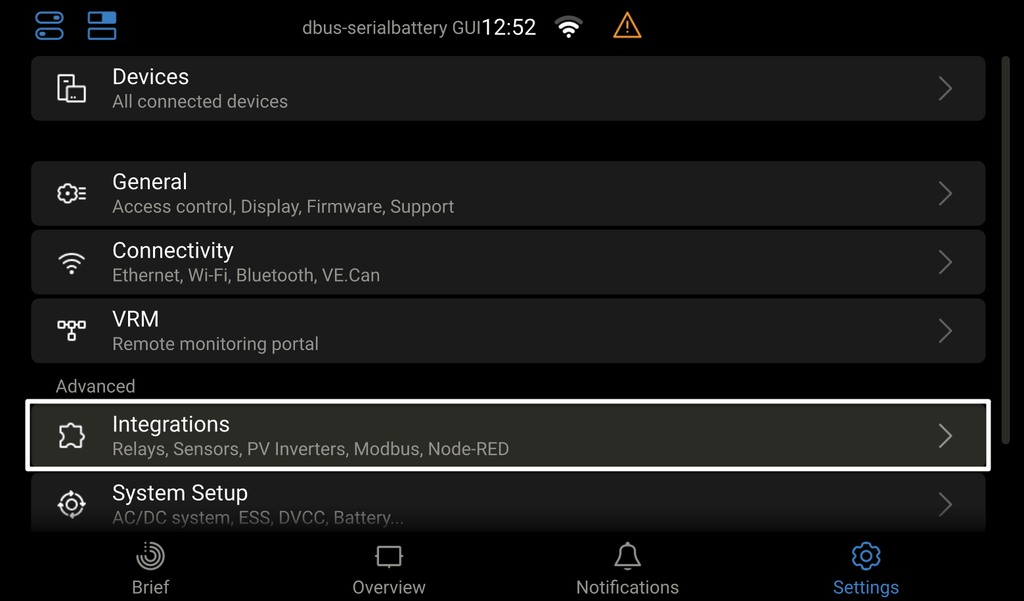
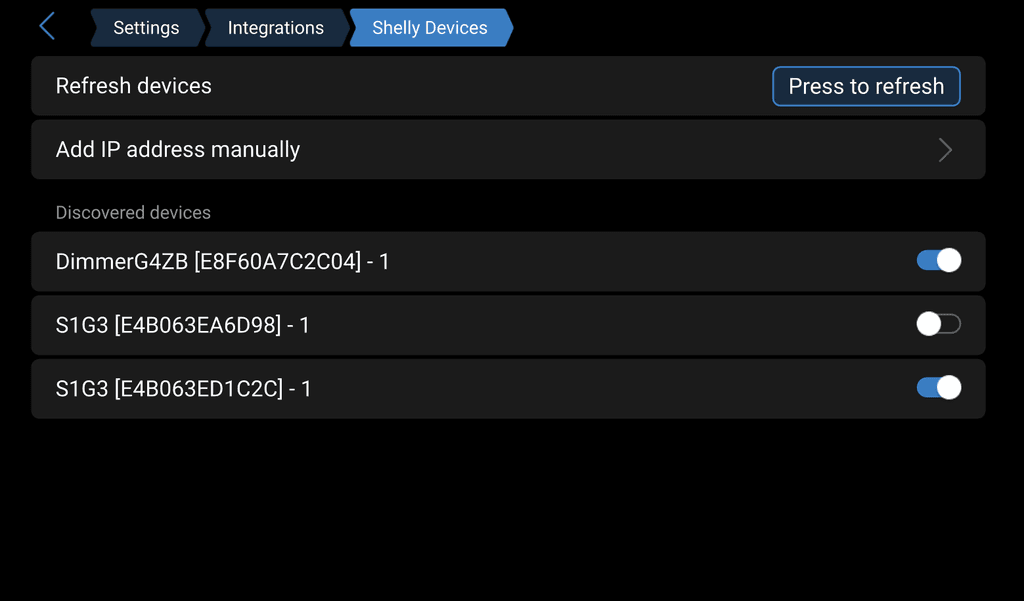
- Auto-Discovery: On your GX Touch display or Remote Console, navigate to Settings > Integrations > Shelly devices.
- Enable & Configure: Your GX device will automatically discover the Shelly devices via mDNS. Simply click to enable the device and assign its role (e.g., AC Meter or Switch). It will instantly appear on your GX Touch screen and the VRM portal’s switch pane!
Method 2: Node-RED on Venus OS Large (Best for Custom Automation)
Victron offers a “Large” firmware image for their GX devices that comes pre-installed with Node-RED, a powerful visual programming tool for IoT. While native integration gets the devices onto the dashboard, Node-RED lets you build advanced conditional logic.
How to set it up:
- Flash Venus OS Large: Update your GX device firmware to the “Large” image via the firmware settings menu.
- Enable Node-RED: Turn on the Node-RED service and navigate to its web interface on your local network.
- Build the Flow: Drag and drop Victron input nodes to read system states, like battery SOC or grid voltage.
- Control the Shelly: Use Node-RED to trigger the Shelly relays natively over the local network. For example, you can set a rule that automatically activates the Shelly relay for your pool pump only when battery SOC is above 95% and the grid is online.

Our example we look at if the Grid input falls out, It will then turn off the select Shelly device with large loads
Method 3: The Ultimate Hub: Home Assistant
For the most robust smart home setup, you can bridge both Victron and Shelly together using an external Home Assistant server. Both ecosystems have flawless native integrations with Home Assistant.
How to set it up:
- Integrate Victron: Enable Modbus TCP or MQTT on your Cerbo GX and add the Victron integration into Home Assistant.
- Integrate Shelly: Add your Shelly devices to Home Assistant using the native Shelly integration (which runs 100% locally).
- Automate: Use Home Assistant’s powerful automation engine to create advanced rules spanning your whole home. For instance: If Victron Battery SOC < 50% AND Grid State is Disconnected -> Turn off Shelly Geyser Relay and send a push notification.
Need Professional Smart Energy Solutions?
Setting up customized, automated energy infrastructure requires careful planning, secure network configuration, and the right hardware.
RitchieIoT is a certified Shelly Bronze Installer specializing in enterprise energy management, custom IoT infrastructure, and reliable home automation. Whether you need custom Node-RED programming, Shelly hardware installations, or fully managed cloud-hosted Home Assistant instances, we design systems tailored to the South African market.
Ready to build a smarter, more resilient power system? Visit www.ritchieiot.co.za to learn more about our services in the Centurion area and contact us today to optimize your energy.