
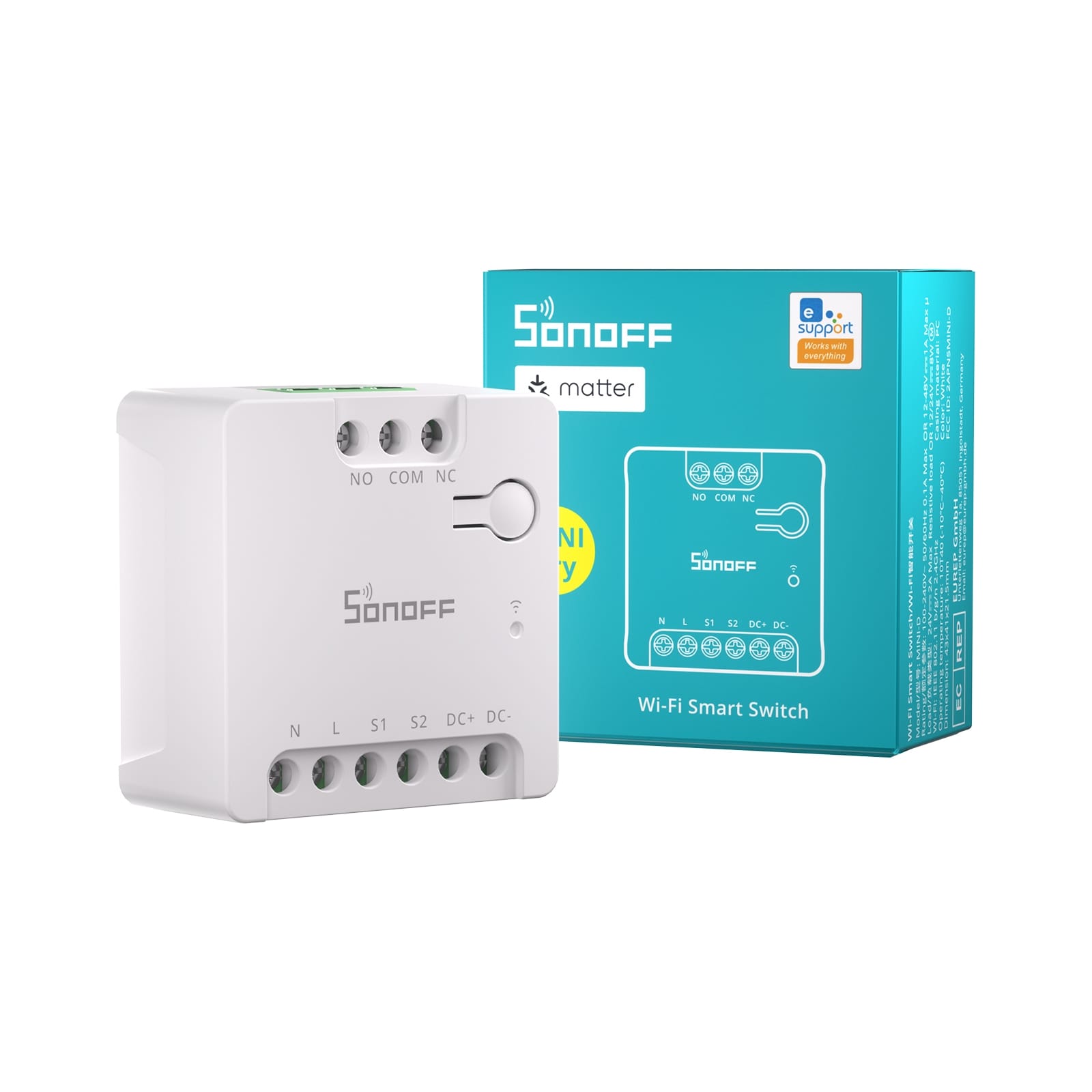
Description
Highlights
- Wi-Fi Connectivity: Connect directly to your home Wi-Fi network for full control of your lights and appliances from anywhere via the app.
- Matter Protocol: With Matter protocol support, MINI-D ensures seamless integration with other brands and ecosystems, allowing you to build a unified and efficient smart home setup.
Notice:
The product supports Matter platforms like Apple Home, Google Home, Alexa, Home Assistant, and Samsung SmartThings. Only support basic functions (on/off).
- AC/DC Power Supply: Compatible with AC and DC power sources, ensuring flexible installation in various environments.
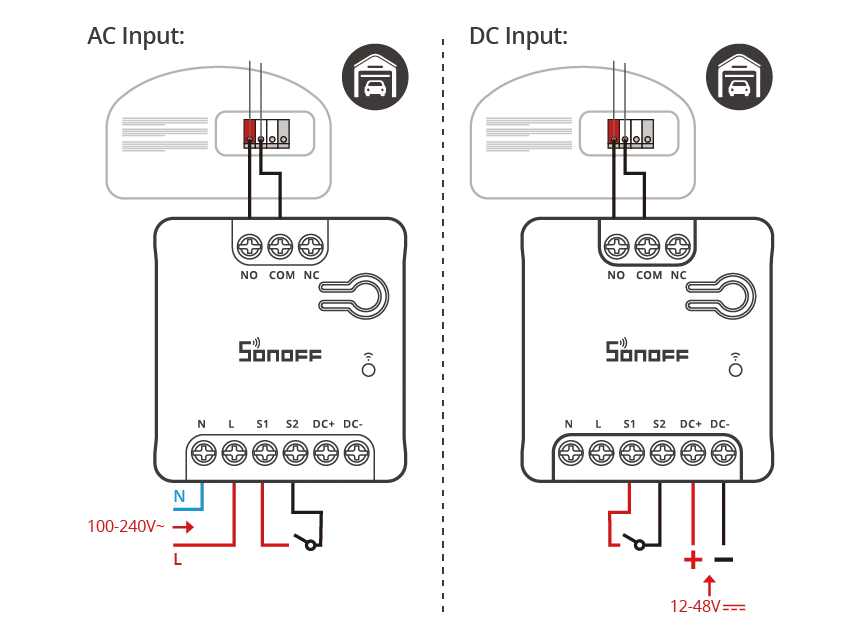
- Dry Contact Support: Perfect for controlling dry contact devices such as motors, garage doors, gates, and other specialized equipment.
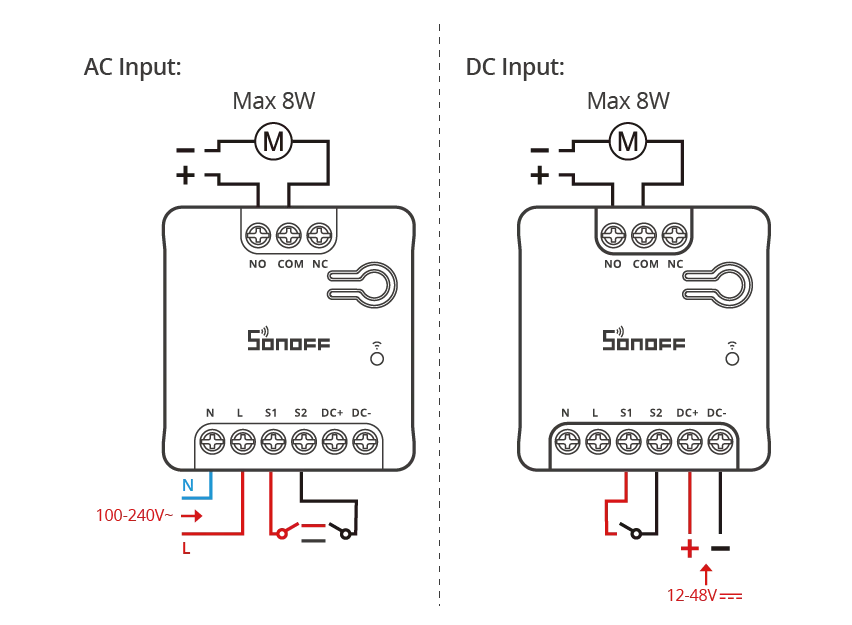
- DC Low-Power Motor Support (Max 8W): Specifically engineered to control DC low-power motor loads up to 8W, making it a perfectly smart control for DC low-power systems.
Applications
- Dry Contact Control Applications
- Garage Doors
Enable remote/voice control for opening or closing garage doors securely and conveniently.
- Access Control Systems
Integrate with electric locks or gate systems for smarter entry and exit automation.
- HVAC Systems
Trigger air conditioning units, ventilation fans, or climate controllers that use dry contact inputs.
- Heating Systems
Control boilers or heaters in temperature-sensitive scenarios via app, schedule, or automation scenes.
- DC Low-Power Load Applications (up to 8W)
- Solenoid Valves
Automate irrigation, water distribution, or fluid control systems in agriculture or smart gardens.
- Motors
Operate small curtain motors, mini fans, or other DC-driven actuators in home or industrial use.
- Irrigation & Sprinkler Systems
Schedule or trigger water flow remotely to optimize watering routines and conserve resources.
- etc…
Specification
Model | |
MCU | ESP32-D0WDR2 |
Rating | 100-240V~ 50/60Hz 0.1A Max OR 12-48V⎓1A Max μ |
Load | 24V⎓2A Max Resistive load OR 12/24V⎓8W
|
Wireless Connectivity | Wi-Fi: IEEE 802.11 b/g/n 2.4GHz |
Wire Diameter | φ0.5-2.5mm(24-14AWG) |
Standby Power Consumption | About 1W |
Net Weight | 34.5g |
Dimension | 41x43x21.5mm |
Color | White |
Casing Material | PC |
Applicable Place | Indoor |
Working Temperature | 10T40 (-10℃~40℃) |
Working Humidity | 5%~95% RH, non-condensing |
Working height | Less than 2000m |
Certification | CE/FCC/RoHS |

Key Features
eWeLink Platform
Notice: This functionality is available only when the device is paired with the eWeLink app. For capabilities when the device is paired via Matter with Alexa, Google Home, or other Matter platforms, refer to Key Features >> Matter Platform. |
Device Home Page Functions | |
Key Features | Feature Description |
On / Off | Device on/off state |
Schedule | Set the device to complete the specified action at the specified time. |
Timer | Set delayed actions for the device to execute after a specified time |
Loop Timer | The device executes a predefined action cyclically at specified time intervals. |
Device Settings | ||
Key Features | Feature Description | |
Third-party Platforms | Alexa | You can control your smart devices through third-party services, including voice control. |
Google Home | ||
IFTTT | ||
SmartThings | ||
Alice | ||
Assign location | Set up the home and room where the device is located. | |
Share | The device can be shared with other eweLink accounts. | |
Create Group | After multiple devices are created into a group, you can synchronize all devices in the group. | |
Smart Scene | Trigger Condition |
|
Execution Action |
| |
LAN Control | A control method where the app communicates directly with the device over the same router, without going through the cloud platform.
| |
eWeLink-Remote Sub-devices | If you have also purchased the SONOFF R5, you can add it as a “sub-device” to the MINI-RBS. By using the “Scene Function” in the eWeLink app, the two devices can be linked, allowing the Sonoff R5 to function as a convenient wireless remote controller. | |
Switch Mode | Mode | External Tigger Mode Setting:
|
Detach Relay | The states of external switches and relays are separated or not.
| |
Push notifications | After turning on “Push notifications”, also make sure to grant notification permissions in Phone Settings > Permissions for the eWeLink app. This allows you to receive push notifications when the device status changes.
| |
Offline Alert | Turn on the “Offline Notifications” feature, and grant eWeLink notification permissions in Phone Settings > Permissions. You will receive a mobile push notification 5 minutes after the device goes offline.
| |
Logs | Records of device status changes. (You can view the operation records of the past three months) | |
Network Indicator |
| |
Power-on State | The switch state of the device when power is restored after a power outage.
| |
Power-on State will be delayed for the time you set.
| ||
Inching Settings | The device automatically turns off/turns on after being on for a specified duration.
| |
Wi-Fi Settings | Configure the WiFi network connected to the device. | |
Enable Pairing Mode | The device will enter pairing mode, allowing you to add it to a Matter platform like Apple, Alexa, or Google. After 10 minutes, the device will automatically exit pairing mode. | |
Delete Device | Remove the device from the eWeLink platform. | |
Matter Platform
Notice: To use voice control with Home Assistant, you need to purchase the official Home Assistant speaker (Home Assistant Voice) separately. |
Platforms and Capabilities | Apple Home | Google Home | Alexa | Home Assistant |
On/Off | √ | √ | √ | √ |
Voice Control | √ | √ | √ | √* |
Scene | √ | √ | √ | √ |
|
Installation and Configuration Guide
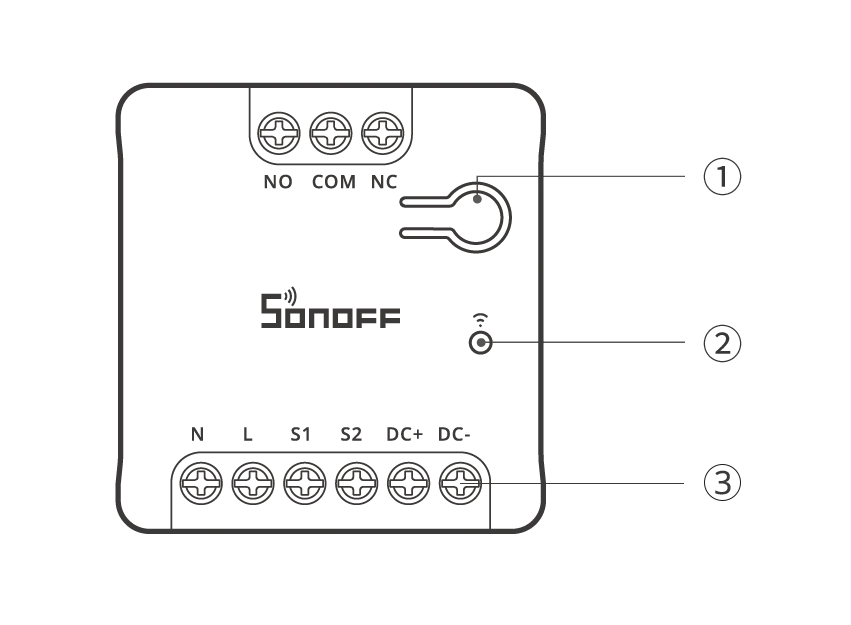
①Button
Button | Description |
Single press | Turn on/off the device |
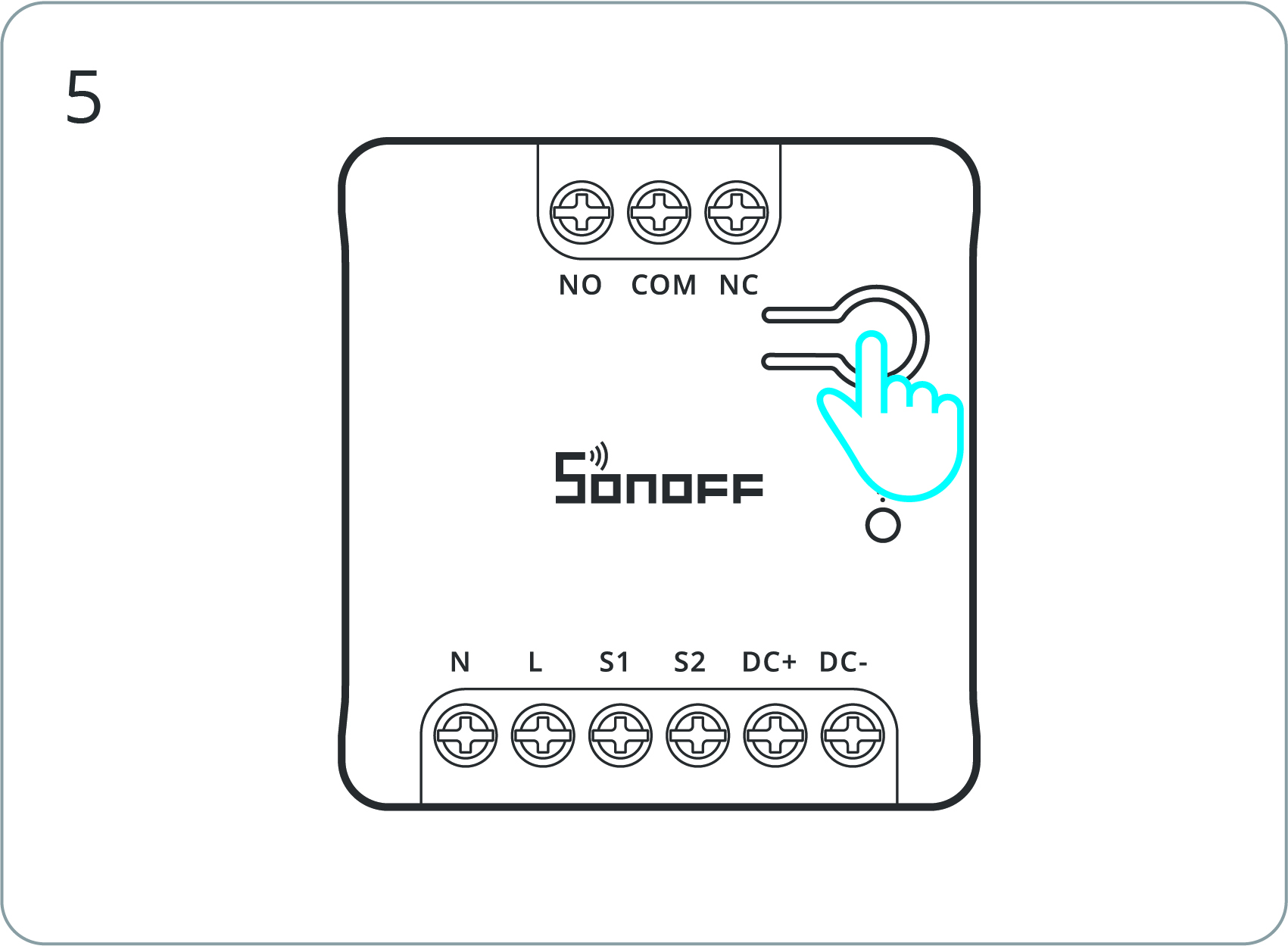
Press & hold 5 seconds | Device enters the pairing mode (Pairing time 10 minutes) |
Triple short press | Switches the external switch type |
Notice:
|
② LED indicator (Blue)
LED Indicator (Blue) | Description |
Keeps on | Online |
Flashes once | Offline |
Flashes twice | LAN connection active |
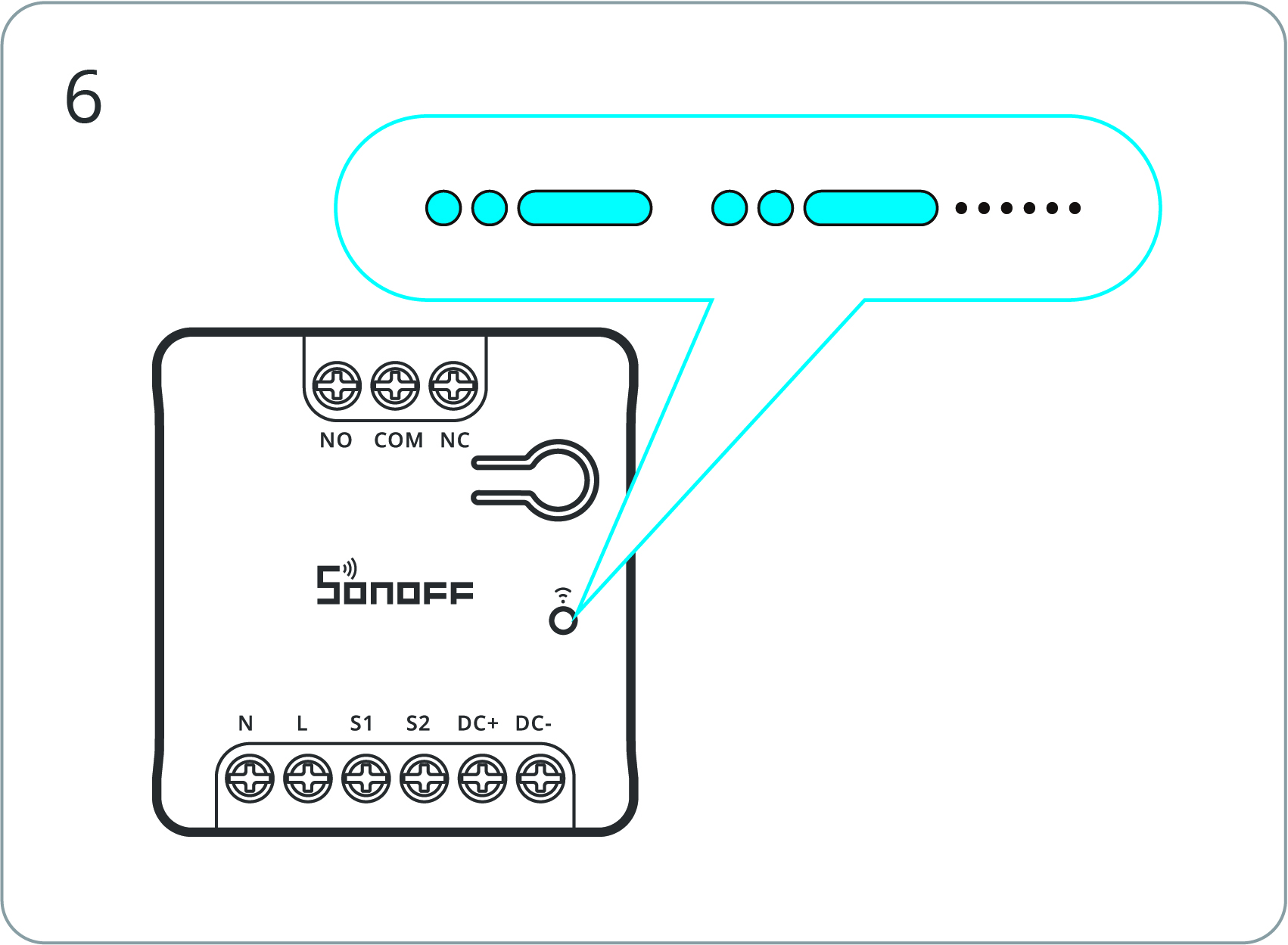
Flashes two short + one long | In Pairing Mode |
Flashes three times | External switch type changed |
③ Input/Output Terminal
Terminals | Description |
NO | Normally Open (Output Terminal) |
COM | Common (Output Terminal) |
NC | Normally Closed (Output Terminal) |
N | Neutral (Input Terminal) |
L | Live (Input Terminal) |
S1 | External Switch (Input Terminal) |
S2 | External Switch (Input Terminal) |
DC+ | 12V-48V DC Positive (Input Terminal) |
DC- | 12V-48V DC Negative (Input Terminal) |
Wiring Diagrams
WARNING:
|
- DC low-power load wiring
- Dry contact wiring
Notice:
|
Terminals | | Wires | |
NO | Normally Open (Output Terminal) | | |
COM | Common (Output Terminal) | | |
NC | Normally Closed (Output Terminal) | | |
N | Neutral (Input Terminal) | N | Neutral Wire |
L | Live (Input Terminal) | L | Live (100~240V) Wire |
S1 | External Switch (Input Terminal) | | |
S2 | External Switch (Input Terminal) | | |
DC+ | 12V-48V DC Positive (Input Terminal) | + | 12V-48V DC Positive Wire |
DC- | 12V-48V DC Negative (Input Terminal) | – | 12V-48V DC Negative Wire |
Add Device
eWeLink Platform
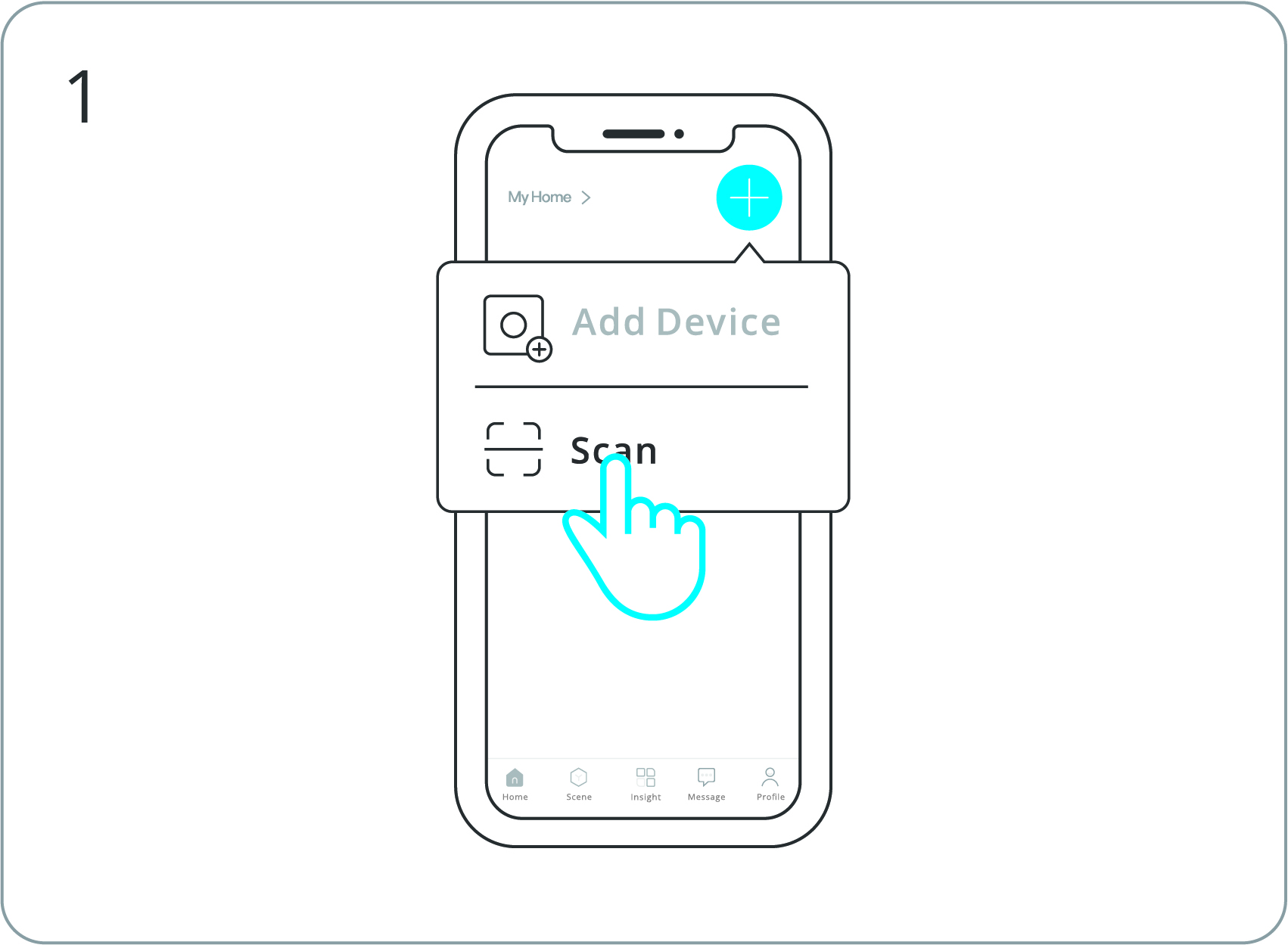
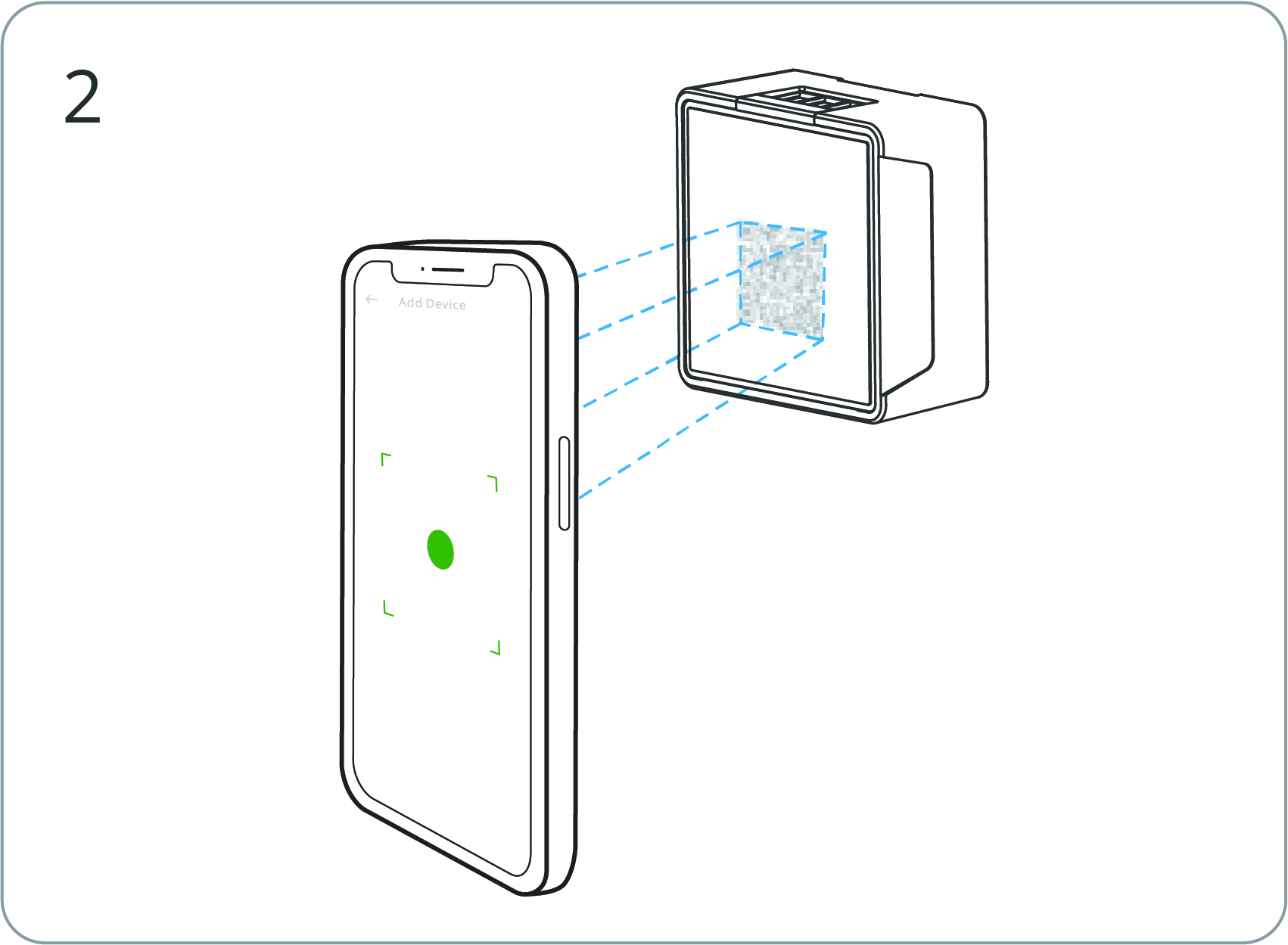
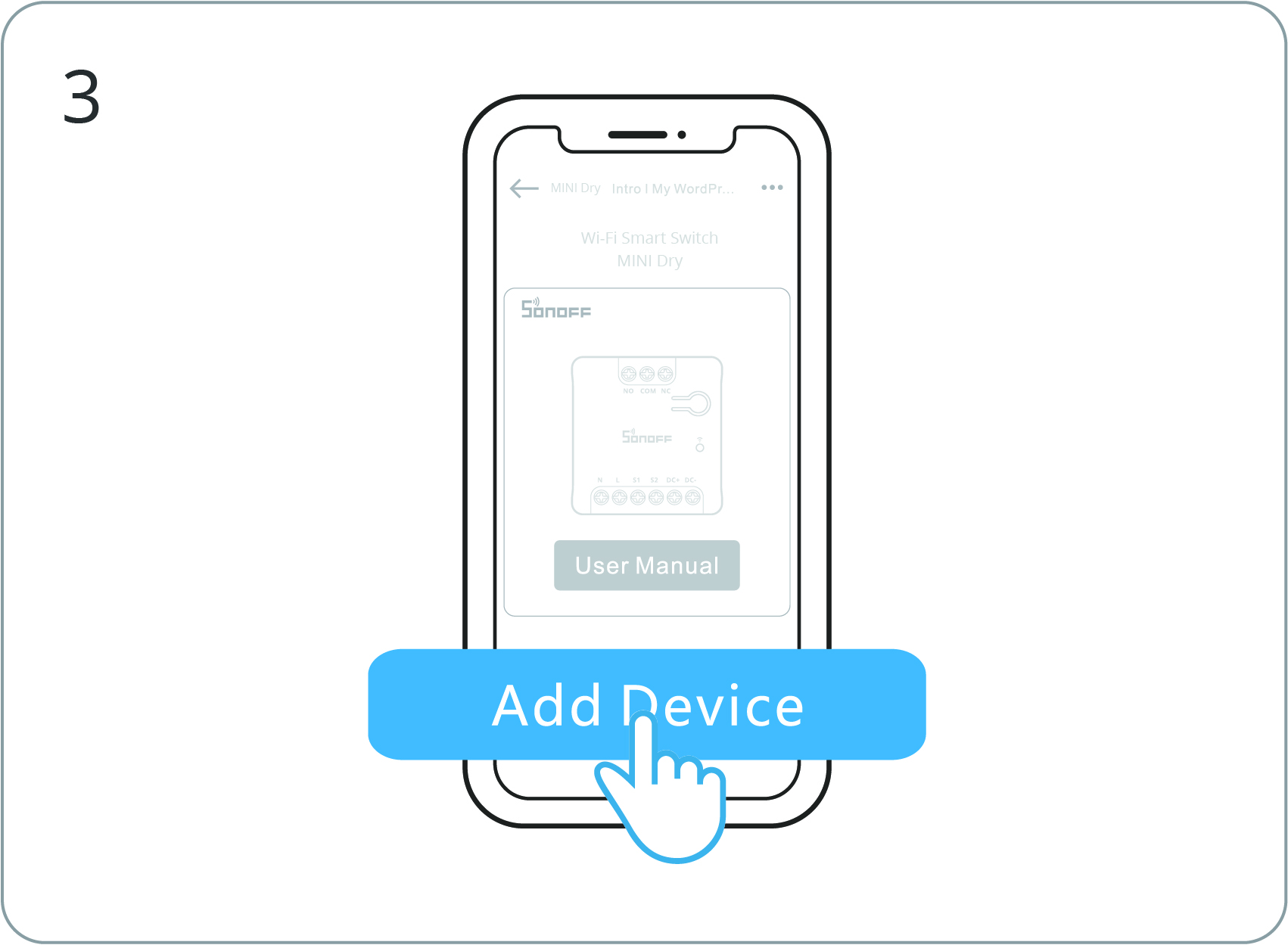
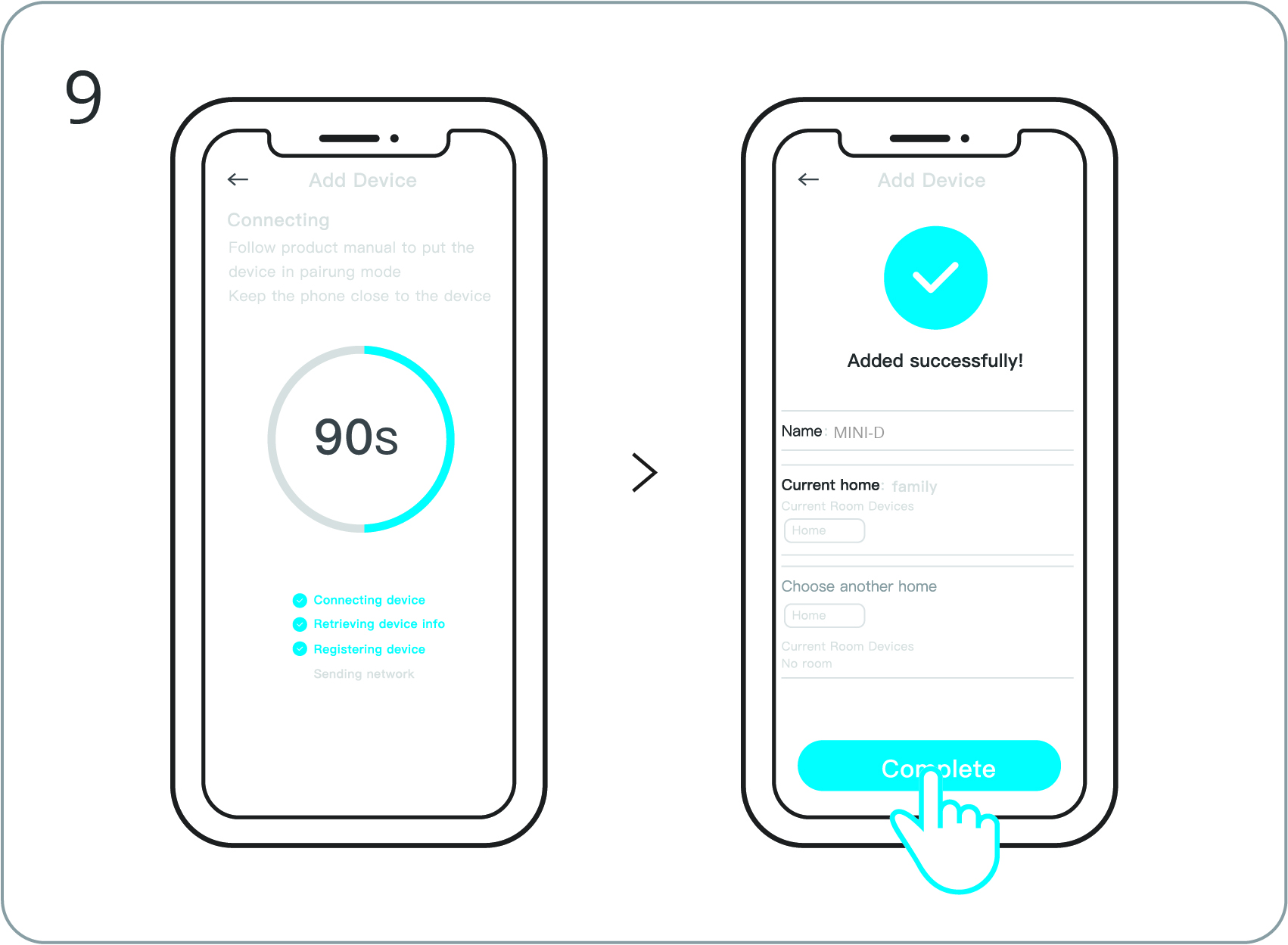
Open eWeLink to scan the QR code on the Quick Guide or the device itself to add the device.
Enter “Scan”. |
Scan the QR code on the device. |
Select “Add Device”. |
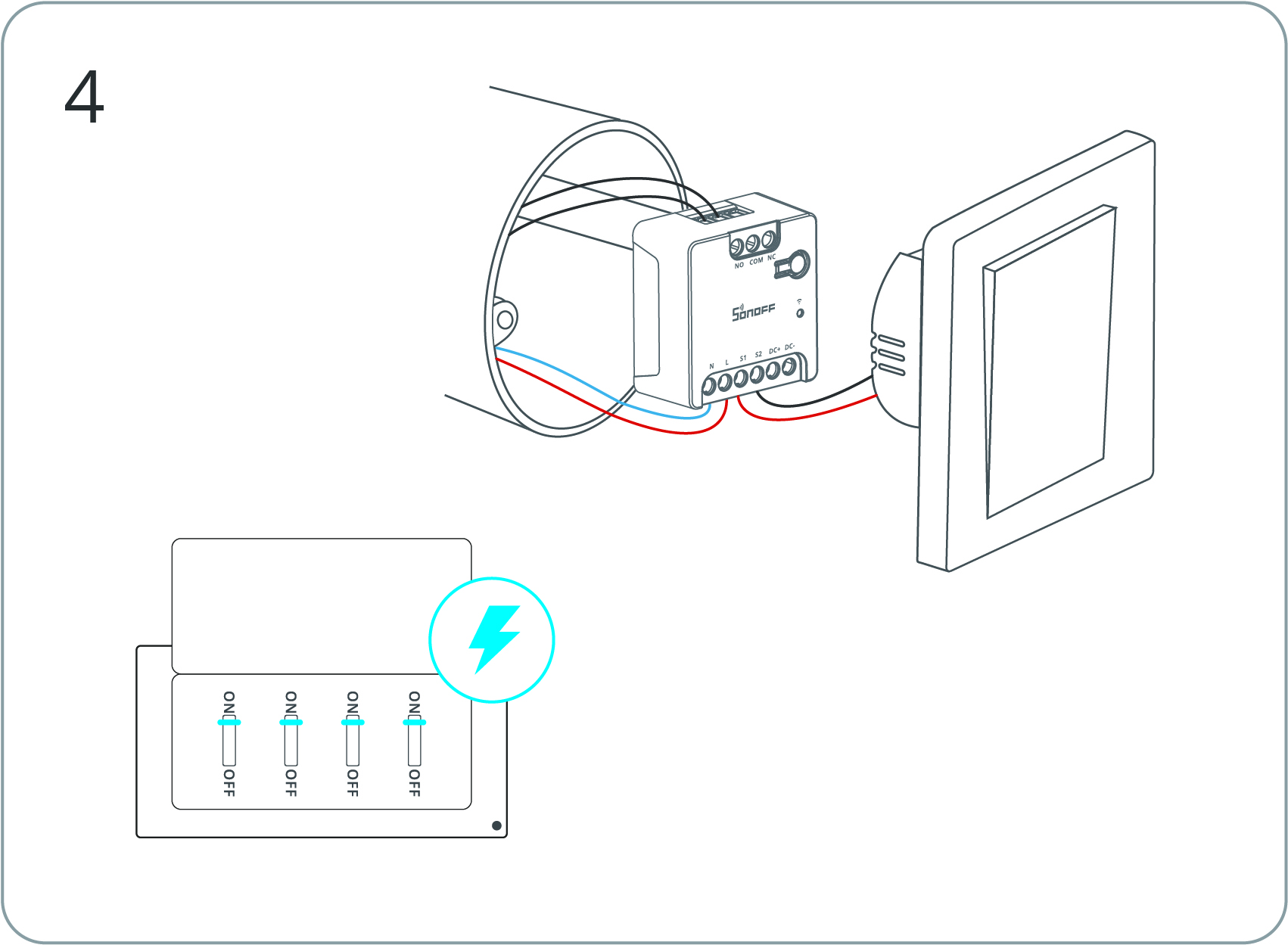
Power on the device. |
Long press the button for 5 seconds. |
Check Wi-Fi LED indicator flashing status (Two short and one long). |
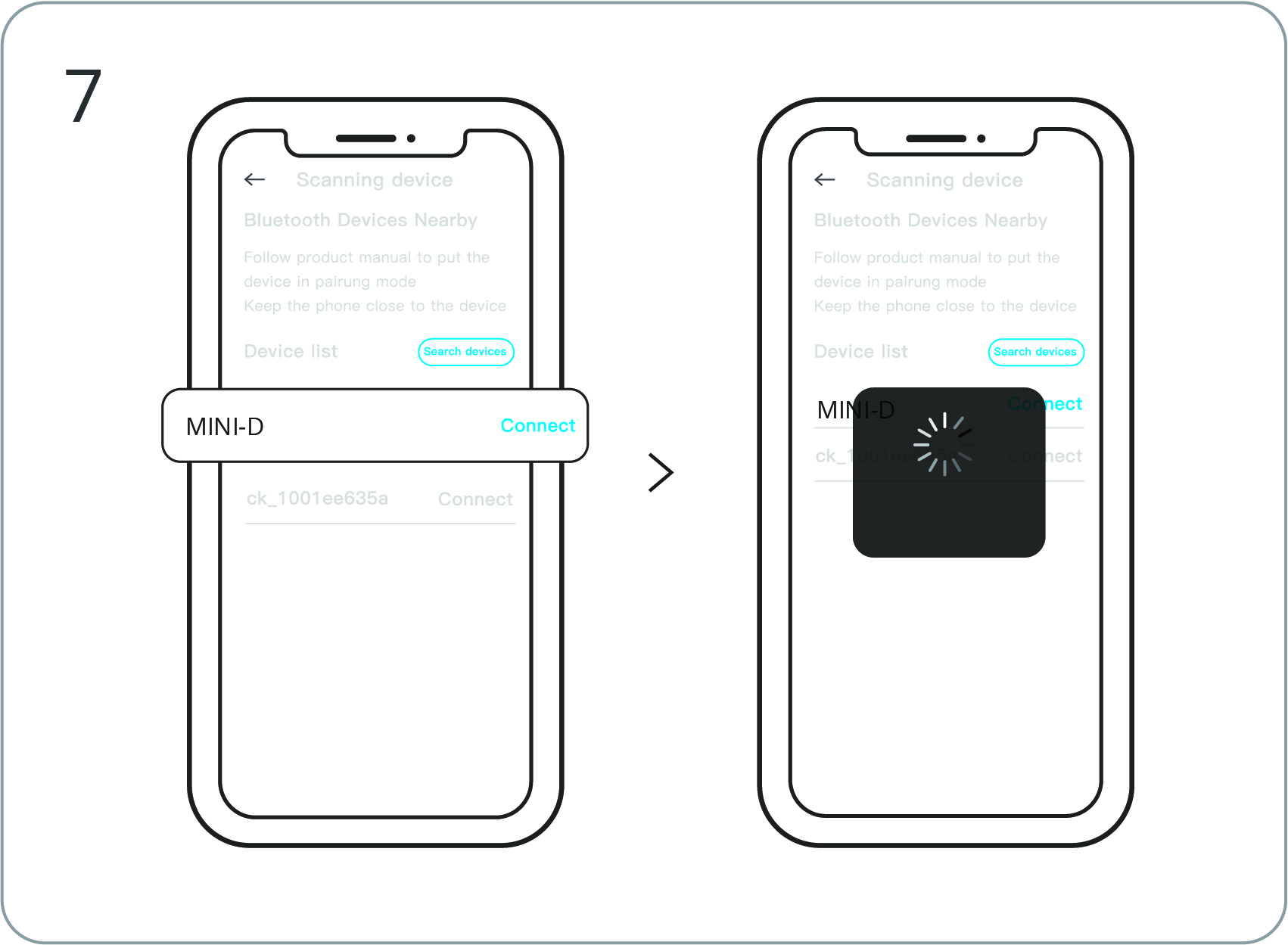
Search for the device and start connecting. |
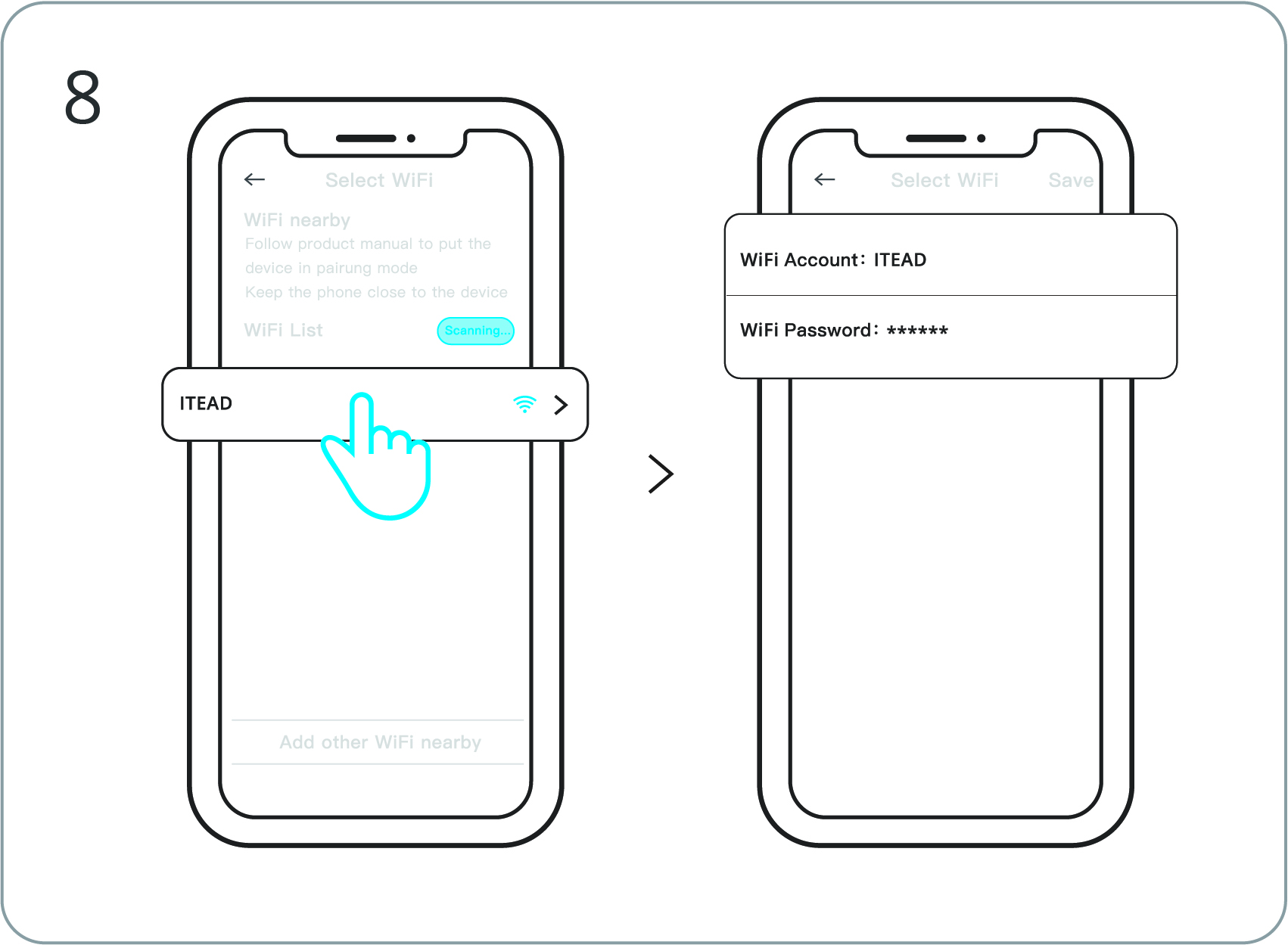
Select the “Wi-Fi” network and enter the password. |
Device “Added completely”. |
Matter Platform
Open a Matter-compatible App to scan the Matter QR code on the Quick Guide or the device itself to add the device.
Add to Apple via Matter |
Add to Google via Matter |
Add to Alexa via Matter |
Add to SmartThings via Matter |
Add to Home Assiatant via Matter |


Reviews
There are no reviews yet.